# R0. Sync

Using this module, you’ll have the ability to automatically migrate emails directly to your Gmail inbox. Super handy when you need to receive an OTP code and use it within a bot.

### How to use R0.Sync.

To get started, you’ll need to select the "R0.Sync" module on the ***R0.Modules*** tab.

<figure><img src="https://1355382653-files.gitbook.io/~/files/v0/b/gitbook-x-prod.appspot.com/o/spaces%2FEStZw1m8bxCp5su8JdUE%2Fuploads%2FRlOK3JolvxSnivMGKMc3%2FSync%201.png?alt=media&#x26;token=319af51c-53d7-4873-82a7-bfa8dc7ebcfe" alt=""><figcaption></figcaption></figure>

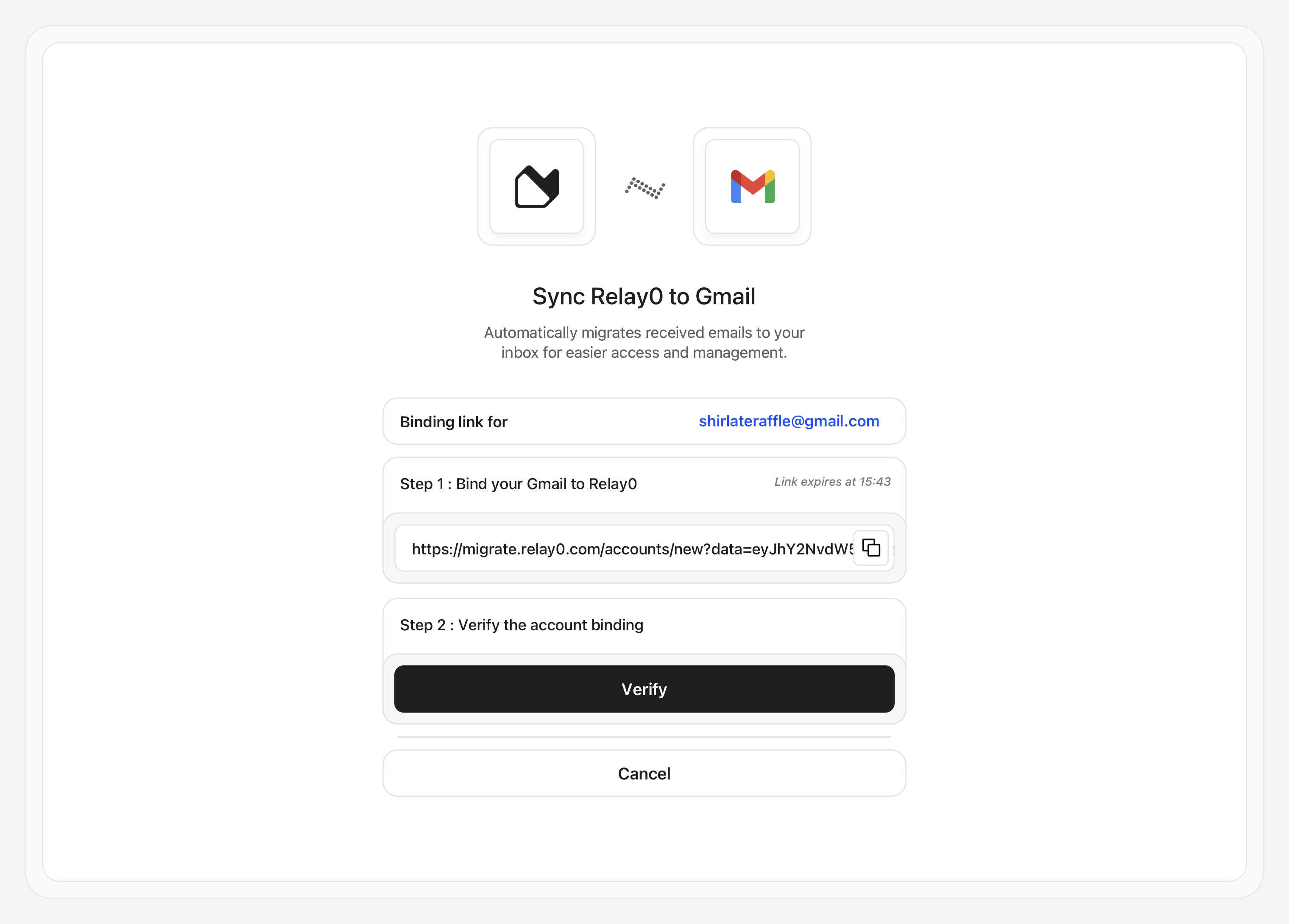
In the input field, enter the Gmail address of the account you want to link, then click **“Generate Binding Link.”**

<figure><img src="https://1355382653-files.gitbook.io/~/files/v0/b/gitbook-x-prod.appspot.com/o/spaces%2FEStZw1m8bxCp5su8JdUE%2Fuploads%2FN6MMq8Oco4EKXAVsBjwx%2FSync%202.png?alt=media&#x26;token=5f2f4050-a326-4b18-8334-30bbdc64e323" alt=""><figcaption></figcaption></figure>

**Copy** the binding link and open it in a **new tab**.

{% hint style="warning" %}
If you are using the **auto-translator**, please **disable it**, as it modifies the link and makes it unusable.
{% endhint %}

<figure><img src="https://1355382653-files.gitbook.io/~/files/v0/b/gitbook-x-prod.appspot.com/o/spaces%2FEStZw1m8bxCp5su8JdUE%2Fuploads%2Fz7PNdjZOb0EP4JH8Xm5k%2FSync%203.png?alt=media&#x26;token=d660156a-f254-4bcf-a2f5-4008ca293e63" alt=""><figcaption></figcaption></figure>

Since the **R0.Sync** app hasn’t been verified by Google yet, you’ll be redirected to this warning page.\
To continue, first click **“Advanced”**, then select **“Go to relay0.com (unsafe)”**

<figure><img src="https://1355382653-files.gitbook.io/~/files/v0/b/gitbook-x-prod.appspot.com/o/spaces%2FEStZw1m8bxCp5su8JdUE%2Fuploads%2FJvhlZx6aDsdRrLAVExB3%2FSync%204.png?alt=media&#x26;token=7e13d2e1-1204-4d24-988f-eab59e6de6ab" alt=""><figcaption></figcaption></figure>

Check **“Select all”**, then click **“Continue.”**

<figure><img src="https://1355382653-files.gitbook.io/~/files/v0/b/gitbook-x-prod.appspot.com/o/spaces%2FEStZw1m8bxCp5su8JdUE%2Fuploads%2FCI0pCWIsHslJYuw7twk9%2FSync%205.png?alt=media&#x26;token=9c7cba94-e797-4345-a4a7-00bc1ba21fba" alt=""><figcaption></figcaption></figure>

{% hint style="info" %}
For your information, we use the following three scopes:

* **gmail.insert** — Add emails to your Gmail inbox\
  \&#xNAN;*(used to insert the migrated emails into your mailbox)*
* **gmail.modify** — View, compose, and send emails from your Gmail account\
  \&#xNAN;*(used to mark migrated emails as “unread”)*
* **gmail.readonly** — View your emails and mail settings\
  \&#xNAN;*(required for the overall process to function properly)*

We only request the permissions strictly necessary for the migration process.\
However, we completely understand if you’re not comfortable granting this level of access to your main inbox. In that case, feel free to create a **fresh Gmail account** just for this purpose.
{% endhint %}

If you’ve done everything correctly, you’ll see this confirmation page. Simply close it and return to your dashboard and click on **"Verify".**

<figure><img src="https://1355382653-files.gitbook.io/~/files/v0/b/gitbook-x-prod.appspot.com/o/spaces%2FEStZw1m8bxCp5su8JdUE%2Fuploads%2F2C3zRgaGQ7PGuOrgtP5S%2FSync%206.png?alt=media&#x26;token=67a92eff-c155-4eaf-ac41-3b9ed47cce3c" alt=""><figcaption></figcaption></figure>

<figure><img src="https://1355382653-files.gitbook.io/~/files/v0/b/gitbook-x-prod.appspot.com/o/spaces%2FEStZw1m8bxCp5su8JdUE%2Fuploads%2FWXdHjM2zJHLDjsJTy8hL%2FSync%207.png?alt=media&#x26;token=384316db-b5fd-48ee-9da2-a5168ce3edb3" alt=""><figcaption></figcaption></figure>

Final step: **add** a **Sender Filter** and **Save**.

{% hint style="info" %}
To prevent our server resources from being overused, the migration is currently limited to **one sender** per setup.
{% endhint %}

<figure><img src="https://1355382653-files.gitbook.io/~/files/v0/b/gitbook-x-prod.appspot.com/o/spaces%2FEStZw1m8bxCp5su8JdUE%2Fuploads%2Foat6Qan4xAwuOdYNfmQK%2FSync%208.png?alt=media&#x26;token=e693b4f0-8356-4a73-9ba3-978ad57fec24" alt=""><figcaption></figcaption></figure>

To disable **R0.Sync** without unbinding your email, simply clear the sender filter input and click **Save**.